How to Buy $GAME on AO (Permaswap) 🎮
This guide explains how to acquire the $GAME token on the AO (Arweave) network using Permaswap. It walks you through bridging assets into AO and swapping AO/wUSDC for $GAME directly on Permaswap. 【167†source】
1. What Is Permaswap? 🧩
Permaswap is the first cross-chain decentralized exchange (DEX) built on Arweave and deployed on the AO network.
It provides automated market maker (AMM) functionality for token swaps and liquidity provision, making it a core venue for token trading within AO. 【167†source】
2. Before You Begin — What You Need 🧰
| Requirement | Purpose |
|---|---|
| AO-Compatible Wallet (e.g., Wander Wallet) | To hold assets and receive $GAME on the AO network |
| AO Liquidity (e.g., wUSDC, wAR) | Needed to swap for $GAME within the platform |
| Access to Bridge (e.g., AOX) | Convert tokens from Ethereum (USDC, USDT, AR) into AO-wrapped tokens |
3. Step-by-Step Guide to Buying $GAME with Permaswap 🪜
Step 1: Bridge Assets into AO 🌉
Use AOX to convert assets into AO-compatible tokens (wUSDC, wAR).
Step 2: Visit Permaswap Swap Interface 🌐
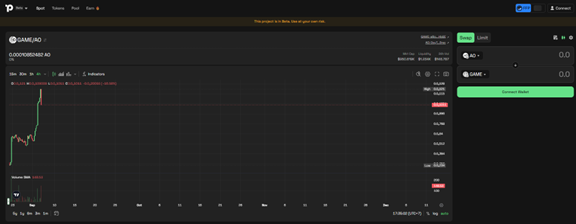
Navigate to: https://www.permaswap.network/#/tokens.
Step 3: Connect Your AO Wallet 🔗
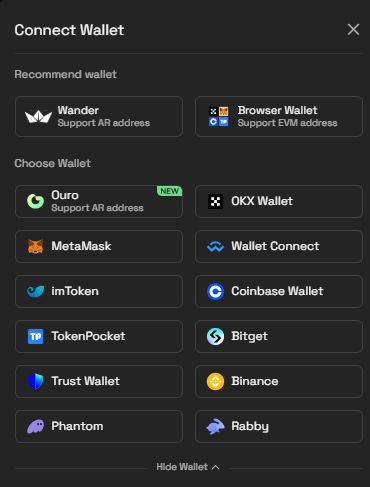 Use your Wander Wallet or another AO-supporting wallet to connect.
Step 4: Setup the Swap ⚙️
Select AO/wUSDC as your source token and choose $GAME as the token to acquire.
Step 5: Input Swap Amount & Execute 🎯
Enter the amount, review slippage and fees, then approve in your wallet.
Step 6: Receive $GAME in Your Wallet 🎉
Upon confirmation, $GAME tokens will appear in your AO wallet. 【167†source】
4. Summary Table 📊
| Step | Action |
|---|---|
| 1 | Bridge assets into AO (wUSDC, wAR, etc.) |
| 2 | Visit the Permaswap swap page |
| 3 | Connect your AO wallet |
| 4 | Swap AO/wUSDC for $GAME |
| 5 | Receive $GAME in your AO wallet |
5. Final Thoughts 🧠
Permaswap provides one of the core venues for token trading in AO.
Using it to buy $GAME is straightforward: bridge, connect, swap, and receive. 🚀